MexxBot Tend · Cobot machine tending cell

Is your CNC waiting on you? Let a cobot do the loading.

An ABB cobot on its own frame that loads and unloads your CNC, or picks parts off the back as they come out and racks them. Designed for your machine, built and tested at Mexx, then installed, wired in and your team trained.

From$175,000+ GST · installed and running
or about $807 a week on business finance (5 yrs at 7.49% p.a., ex GST, subject to approval)
ABB Robotics: “Machine Tending made easy” (44 sec). Video courtesy of ABB.
Two ways it works
Load and unload — or pick parts off the back as they come out, and rack them
Part weight
Up to 8 kg — on the 10 kg arm. Heavier parts on the PoWa 16, 20 or 30.
No more waiting
Runs through breaks — and shift changes, as long as there are parts on the table
Order to handover
About 18 weeks — two days to install, one day to train your team
Every machine is different, so every MexxBot Tend is designed for yours. We confirm the arm, gripper, cycle and price in your quote.
How it works

Two ways a MexxBot Tend works your machine

Most cells load and unload through the door. Some jobs are different: the parts come out the back on their own, and the work is catching them and putting them away.

1Load and unload

For mills and lathes that need a person to swap parts every cycle.

  • Picks a raw part from the table
  • Opens the door and swaps it for the finished partWe wire the cobot into your machine so they talk: door, clamp, cycle start
  • Closes the door and starts the next cycle
  • Puts the finished part back on the table
Standard cell · from $175,000 + GST

2Pick off and rack

For parts that come out on their own, down a chute or into a catcher, and land in a different spot each time.

  • A camera finds each part as it lands
  • The cobot picks it upJaws made for your part
  • Places it neatly in a rack or tray
  • No one standing at the back of the machine
Add the camera · + $18,900 + GST
We're building a pick-off and rack cell with a camera right now. Not sure which way suits you? The check below takes two minutes.
The cell

Everything it takes to tend your machine

Not just a robot arm. A MexxBot Tend is a complete cell, designed around your machine and your part, built around a genuine ABB cobot.

In every cell

  • ABB CRB 1910-10 cobot10 kg payload, 1.52 m reach. Parts up to about 8 kg.
  • Steel frameDesigned for your machine, so the cobot reaches the door, the table and the rack
  • Electric gripper with custom jawsMade for your part
  • Part tableRaw and finished parts, laid out for the cobot
  • Wired into your CNCDoor, clamp and cycle start signals
  • OmniCore controller with SafeMove CollaborativeWorks beside your operators in collaborative mode
  • FlexPendant with ABB's Machine Tending TemplateFree from ABB. Your first job set up by us.
  • Installation, commissioning and trainingTwo days on site, then one day with your team

Options

  • Camera with its own frame + $18,900 + GSTFinds parts that don't land in the same place each time
  • Larger arm: ABB PoWa 16, 20 or 30For heavier parts or a longer reach. Quoted.
  • Extra jaw setsFor other parts you run. Quoted.
  • Air blow-offClears coolant and swarf before the pick. Quoted.
  • Racks and traysMade to suit your parts. Quoted.
No build-and-price here, on purpose. Every cell is designed for one machine, so a menu of options would only mislead you. Use the check below and we confirm the build in your quote.
The software

We set up your first job. Your team can do the next ones.

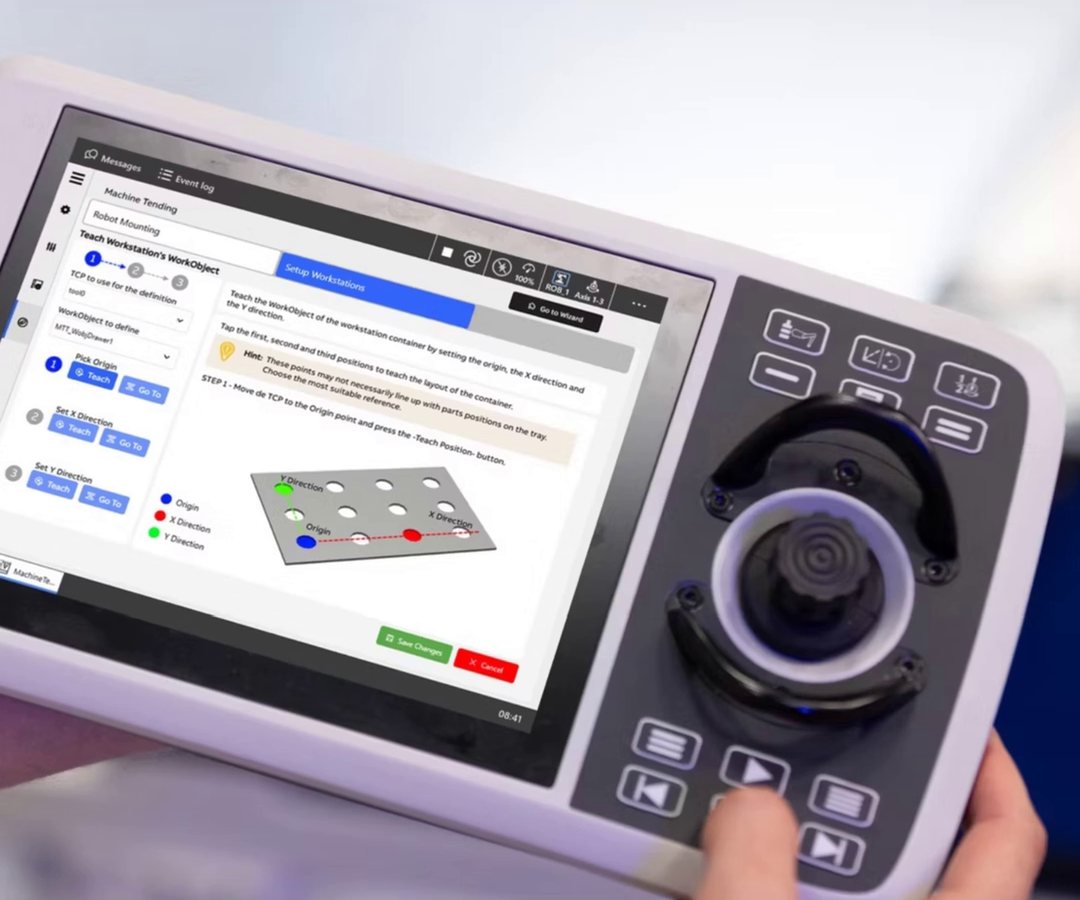
ABB's Machine Tending Template is free and runs on the FlexPendant. We build everything around it: the frame, gripper, wiring and your first program. After that, your operators can teach new parts on the pendant without writing code. A very different part may need new jaws.

ABB FlexPendant showing the Machine Tending app with a tray of parts on screen
Set it up on the pendantABB's machine tending app walks you through a new job, step by step.
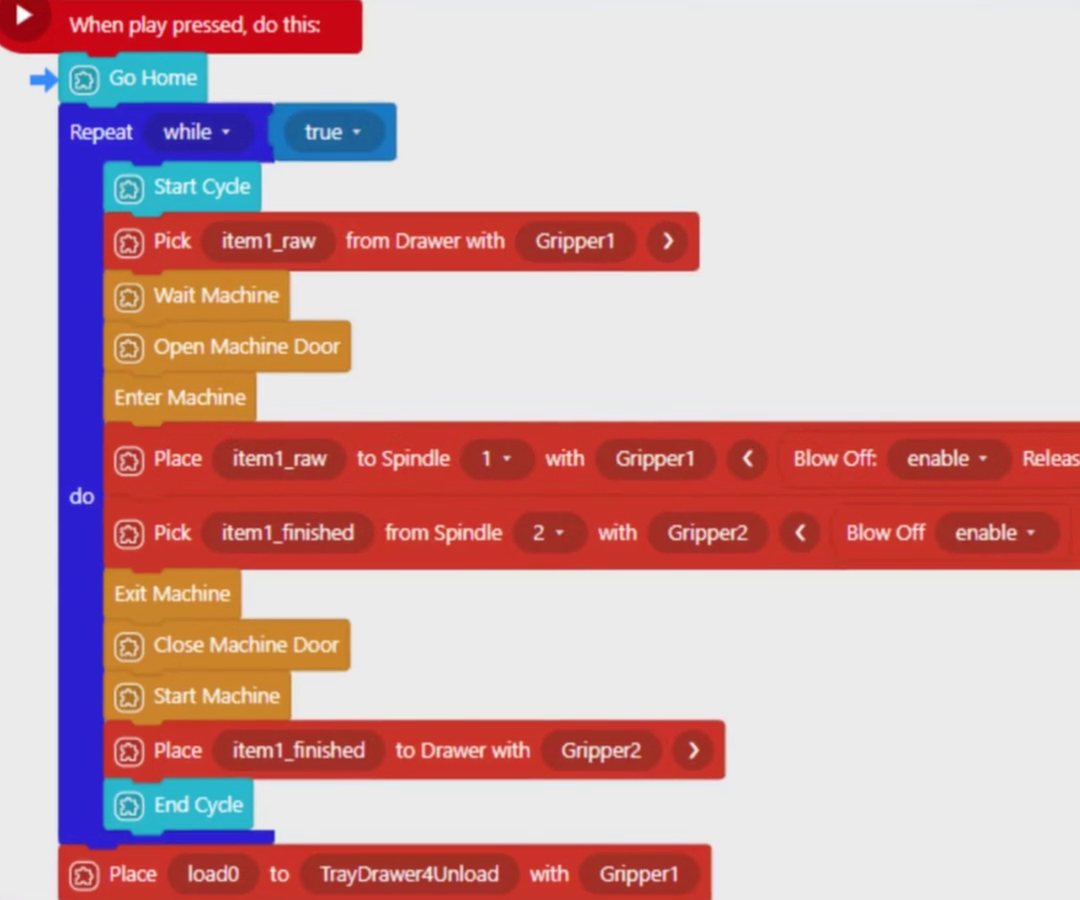
ABB Wizard drag-and-drop program with blocks for pick, open machine door, place and start machine
Drag blocks, not codePick. Open door. Place. Start machine. ABB's Wizard comes on the cobot.
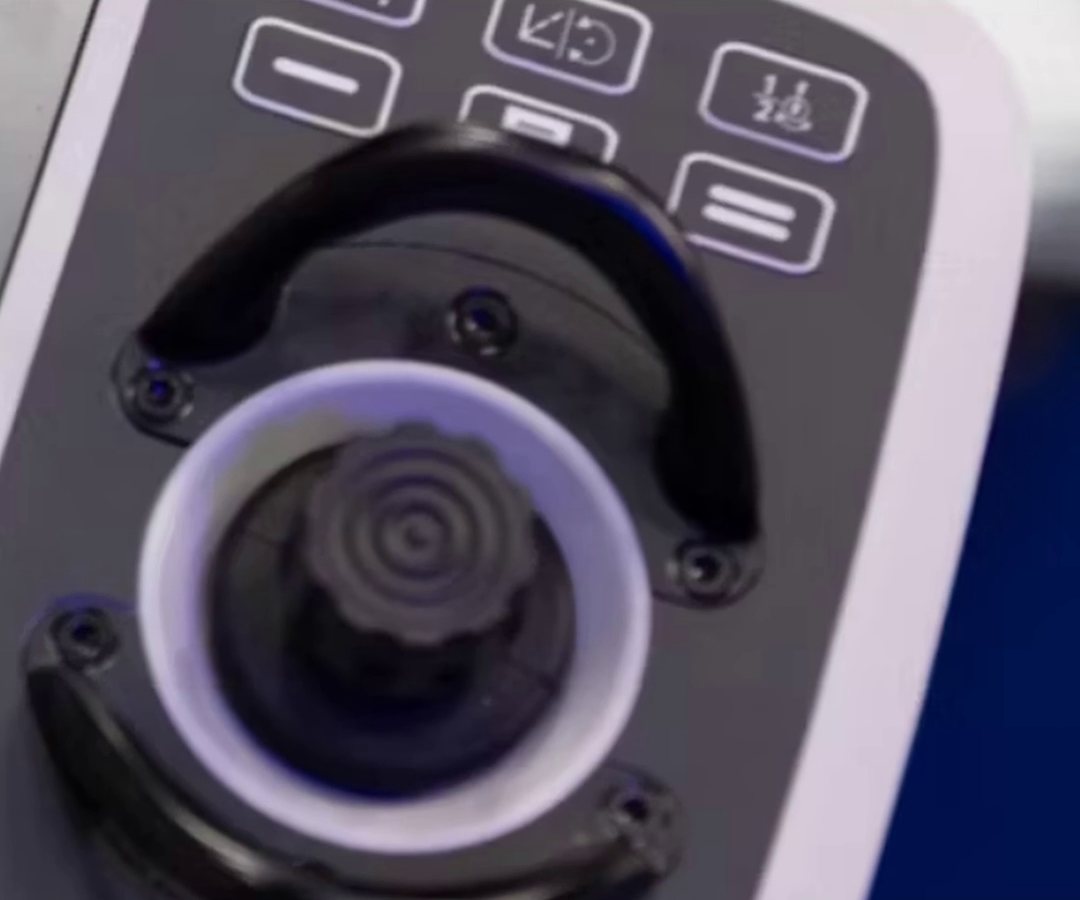
Close-up of the joystick on the ABB FlexPendant
Joystick for the tight spotsJog the arm inside the machine where hands can't reach.
Images courtesy of ABB.
Where the money goes

Nearly 300 hours of engineering, included

Kits built for one standard job can cost less. A cell designed around your machine and your part takes engineering, and every MexxBot Tend includes nearly 300 hours of it: design, electrical, programming, testing, installation and training, by Mexx engineers and tradespeople.

Mechanical design
Frame, part table and gripper jaws
Electrical design
CNC signals and safety
Programming
Your first job, set up and tuned
Testing
Run in our Arundel workshop before it leaves
Electrician on site
Wires the cobot into your machine
Fitter on site
Sets the frame and cell in place
Commissioning
Two days with your machine running
Training
One day for your operators
Per week

Even on one shift, it costs less each week than doing it by hand.

Straight numbers: a cell on finance against a CNC tradesperson loading the machine. Set your shifts and how much of a person's time the machine still needs.

Pay plus super and on-costs. Often $90k–$120k for an experienced tradesperson.
By hand1 tradesperson at your yearly cost
–
MexxBot Tend on financeFinance plus the operator time you keep
–
–
Finance is indicative: 5 years at 7.49% p.a. (the lowest advertised equipment finance rate we found, money.com.au, 11 Oct 2026), no balloon, on the price ex GST. Your rate depends on lender approval. Labour is your yearly cost ÷ 52 weeks, per shift. Excludes servicing and power. And it's before the extra parts: every hour your machine runs instead of waiting is output you don't get now.
How a job runs

From a two-minute check to a cell running beside your machine

About 18 weeks from order to handover. You see and approve the design before we build anything.

Step 1

Free check

Use the check below, or call us. We look at your machine, your parts and your cycle.

Step 2

Firm quote

We confirm the arm, gripper, camera and price for your machine.

Step 3

Design and sign-off

We design the cell and simulate it in ABB RobotStudio with 3D models of your part and machine. You approve it before we build.

Step 4

Built and tested

We build the cell and test it in our Arundel workshop before it leaves.

Step 5

Installed and trained

Two days to install and commission on site. One day of training for your team.

Will it suit my machine?

Check your machine in two minutes

Tell us about your part and your machine. You'll see the build, the price and the weekly finance straight away, and we'll tell you straight if a cobot is the right answer.

1 Your details

Why we ask first: so there's no catch at the end. When you press Check my machine, your details and answers come to Mexx and we email you a copy of the result. We may call once to talk it through. News emails only if you tick the box below.

2 Your part
3 Your machine
Questions

Straight answers

Will it work with my CNC?

Most CNCs can be wired to a cobot through their machine signals: door, clamp and cycle start. Some need an option from the machine builder first. Tell us the make and model and we check before you spend anything.

Does it need a fence?

The cobot runs in collaborative mode, which limits its speed and force so it can work beside people. Every site still gets a risk assessment, and that decides whether any guarding is needed.

What about coolant and swarf?

Parts often come off a CNC wet and covered in swarf. We choose a gripper that suits it, and add an air blow-off if the job needs one.

Can it run overnight?

It keeps going through breaks and shift changes. It can run unattended as long as there are raw parts on the table and your risk assessment allows it.

Do we need a programmer?

No. We set up and test your first job. After that, your team can teach new parts on the pendant with ABB's drag-and-drop blocks. We're a phone call away if you get stuck.

Why does it cost more than a cobot kit?

A kit is the robot and some standard parts. A MexxBot Tend is designed for your machine, wired into it, installed and commissioned, with your team trained. That engineering is most of the price, and we show you where it goes.

Can a grant help pay for it?

Government manufacturing grants may help fund automation. Check the grant's rules before you order: some don't allow anything to be ordered or paid before the grant agreement is signed. We can give you a quote in the form the grant asks for.
Mexx Engineering Pty Ltd
Who stands behind it

MexxBot is a product of Mexx Engineering.

An ABB Authorized Value Provider for over 18 years and a Kemppi Authorized Distributor, working in industrial robotics integration, EPCM and factory automation from Arundel on the Gold Coast. The robot is ABB. The design, build, commissioning, training and ongoing Australian support are ours.

ISO 9001ISO 45001AS9100Certified by ATLAS
(07) 5571 5733 [email protected] 28 Harrington St, Arundel QLD 4214 ABN 58 121 994 563 mexx.com.au →

Is your CNC waiting on you?

Tell us your part and your machine. We'll tell you straight if a cobot is the right answer.

Check my machine
Mexx Engineering Pty Ltd · ABN 58 121 994 563 · ABB Authorized Value Provider · Kemppi Authorized Distributor